
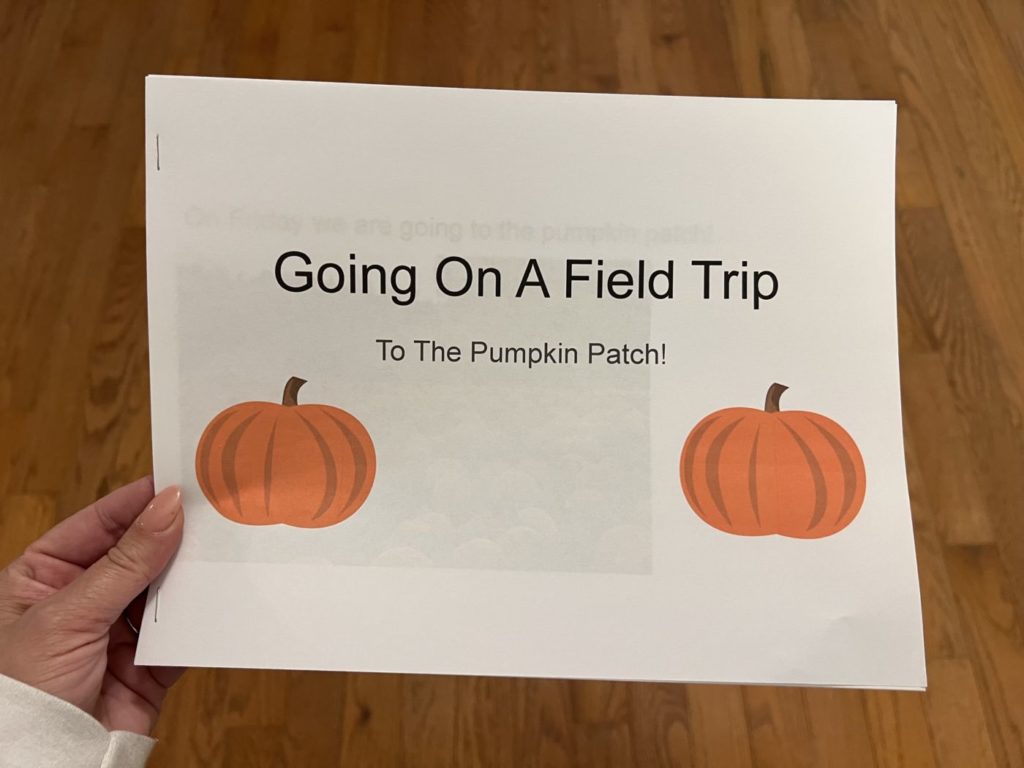
Making Your Own Social Stories
Social Stories are a must have in the special education classroom. Not only do they help students prepare for upcoming events, they help students deal with unexpected changes in their every day life. The only problem is, sometimes we need a social story that is specific to our student and their needs. Today, I’m going to share how I make and use social stories within my classroom.
Google Slides
Chances are you have a google account with access to Google Slides. It’s free, it’s easy to use, and you can share the end product with anyone who needs a copy (I like to send a copy to parents when we are finished writing a social story). Here are some quick, easy directions to follow to make your own social stories:


- First, open a new presentation and name it
- Add the title of your social story
- Add an image by clicking insert -> image -> search the web. From here, search the image you want. I always try to use realistic photos that are close to what the student will be experiencing.
- To add a page, click slide -> new slide
- From here add as many slides as you need to write your story.
- When finished, print your story! To do this click file -> print. Your story will print one page per slide, giving you the perfect social story book!


Ways to Share Social Stories With Students
One thing I love about google is that it’s just about everywhere you are if you have access to the internet! You can get to google slides from your phone, your iPad, your computer, etc. I have all of our social stories available on google slides to share with students when they need them. This makes them quick and easy to access when we are on the go. If we don’t have access to internet, we bring along a physical copy of the social story. One of my favorite things to do is to share the social story with my whole class (when applicable) using my Promethean Board.
Tips When Writing Social Stories
- Use specific language whenever possible.
- Write from the learner’s perspective.
- Explain what student will experience – cover all of the senses!
- If the student is sensitive to noises, ect explain what they may hear and what they can do to prevent overstimulation (ie – “When the tractor comes it will be loud. I can put on the headphones Mrs. Koenig packed me”)
- Coach students through parts of the experience that may be difficult.
- Give students actions and language to help them be proactive (ie- “If I don’t like the tractor, I can say ‘no thank you’ and I won’t have to ride”).
- Be supportive and proactive
Using Social Stories in the Classroom
When using social stories in the classroom, I read them at least 3 separate times with my learner, and more if needed. We start up to two weeks in advance if we can and start talking about what the learner will experience. We read them all the way up to the event, watch videos if we can find any and talk through what is happening using our social story. However, if life throws some challenges our way, we still approach them with social stories. Instead of our stories being proactive, we are supportive with our stories. This is especially true for unexpected events such as funerals, illnesses or hospitalizations.
Social stories are most impactful when we customize them to our learners. Making them is easy with Google Slides! With a little time and effort, you can have a supportive social story to meet your student’s needs.

- The Best Summer Reads for Autism Teachers - July 3, 2024
- Planning for a Successful Summer: A Guide for Parents - June 19, 2024
- Ending the Year on a High Note - June 3, 2024

2 Responses
This is a huge difficulty for me.
I’m always looking for “that” social story to make my life in the classroom easier. I spend just as much, if not more time looking than it would take to make it.
Google Slides seem like the best answer for ending my search and makiymy own a lot quicker! Thank you for this wonderful information!
Hope this was helpful for you! Thanks for reading 🙂